
TradingView Remix moved from a daily 15-request cap to weekly limits tied to your TradingView plan. After running 5 diverse requests on Premium (5×) — from a quick RSI lookup to a full SMC structure analysis — total consumption was 3%. That means Premium comfortably supports power-user workflows for most active traders, while the Free tier (0.25×) burns out in roughly two heavy queries. Edge cases — running dozens of full SMC analyses daily — can still hit the ceiling, so plan accordingly.
💡 Weekly Limits & Plan Benchmarks: Key Takeaways
- Empirical Testing: Running 5 highly diverse queries (including complex SMC structure mapping and Pine generation) on a Premium (5×) account consumed just 3% of the weekly quota.
- Practically Unlimited: Premium allows roughly 165 heavy queries per week, which effectively translates to a restriction-free environment for most power traders.
- Free Plan Limitations: The Free tier is limited to ~8 weekly requests and completely blocks Pine Script generation/modification, serving mostly as an introductory trial.
This guide is built on a real test, not the specs page. Every number below comes from a live session on 2026-05-19. For reference, Remix is officially promoted on the TradingView blog and distributed via the Chrome Web Store (search “TradingView Remix”).
Why This Guide Exists
If you searched for TradingView Remix limits in early May 2026, you probably found articles mentioning “15 AI requests per day.” That information is outdated.
The model has since changed. As observed in v0.15.10 (the mid-May 2026 Chrome Web Store listing), Remix now uses weekly usage that scales with your TradingView plan, and the Pine Script authoring feature is now gated to Essential and above. The exact version when the change rolled out isn’t documented publicly. Most third-party guides have not caught up.
This piece is current, measured, and refuses to repeat outdated specs.
Plan Comparison
Remix usage is tied to your TradingView subscription tier through a multiplier. The base unit is the Essential plan (1×); all other plans scale proportionally. The table below shows estimated weekly request capacity and which features unlock at each tier — Pine Script authoring is the most consequential gate.
| Plan | Multiplier | Estimated Weekly Requests* | Pine Script Authoring | Monthly Price (TradingView) |
|---|---|---|---|---|
| Free | 0.25× | ~8 | ❌ Blocked | $0 |
| Essential | 1× | ~33 | ✅ | ~$15 |
| Plus | 2× | ~65 | ✅ | ~$28 |
| Premium ⭐ | 5× | ~165 | ✅ | ~$60 |
| Ultimate | 20× | ~660 | ✅ | ~$200 |
| Insiders | Unlimited | — | ✅ | Invite-only |
* Estimated from a real test where 5 diverse requests (including SMC analysis and Pine Script generation) consumed 3% on Premium. Light queries consume less; heavy multi-tool analyses consume more.
The Real Test: 5 Requests, 3% Consumed
Setup
- Plan: TradingView Premium
- Chart: BTCUSDT, 15-minute
- Remix version: 0.15.10
- Session date: 2026-05-19
- Starting usage: 0%
Request 1 — RSI Lookup (1 tool, ~5 seconds)
“What is the current RSI 14 value for BTCUSDT and what does it indicate?”
Direct answer with the value (44.66 at test time), interpretation (“bearish-neutral, in no-man’s land”), and a follow-up suggestion. This is the lightest type of request — a quick data fetch with no chart action.
Request 2 — Multi-Indicator Add (3 tools, ~30 seconds)
“Add EMA 20, EMA 50, and RSI 14 indicators to this chart”
The chart updated instantly. Remix returned a confirmation with the Study IDs and offered a follow-up read of current values.
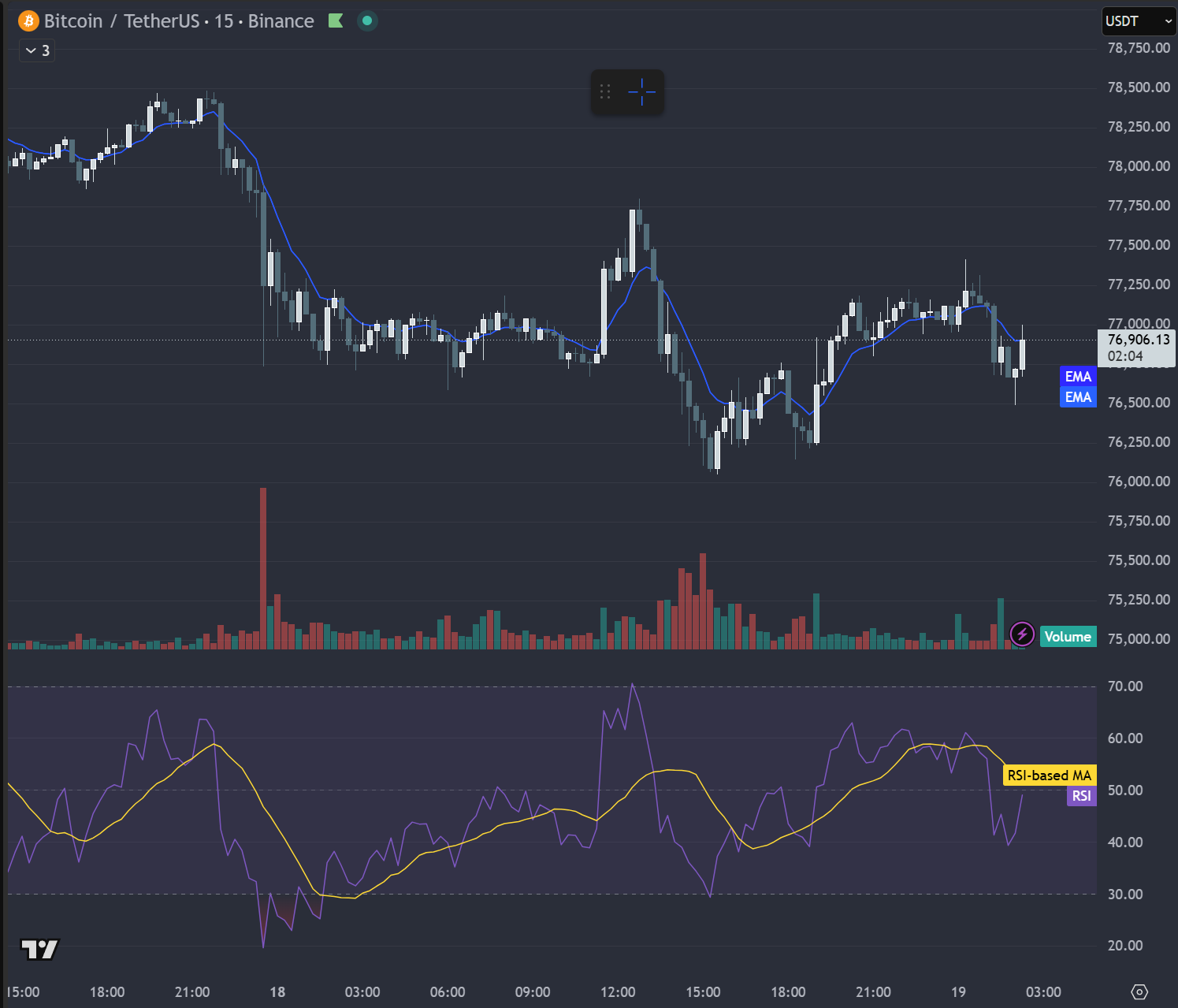 Chart by TradingView
Notable: The RSI add automatically included an RSI-based moving average overlay (yellow line). Remix interprets requests with a small amount of helpful expansion rather than minimal execution.
Request 3 — Full Analysis with 24h Scenarios (15 tools, ~3 minutes)
“Analyze the current BTCUSDT 15-minute chart for trend, momentum, and volume, then provide scenarios for the next 24 hours”
This was the heaviest request of the test. Remix pulled multi-timeframe context (1H, 4H, 1D), produced a structured analysis, and delivered a tactical trade plan with:
- Entry zone and trigger condition
- Stop loss and invalidation level
- TP1 and TP2 with R:R ratios
- Position sizing recommendation
- Counter-scenario (bullish bounce) with conditions
The response included the standard “Educational, not financial advice” disclaimer and flagged its own weaknesses (e.g., a tight R:R on one target). This kind of multi-tool synthesis is where the 15-tool cost makes sense.
Request 4 — Pine Script Generation (5 tools, ~2 minutes)
“Write a Pine Script v6 code that displays a buy signal when EMA 20 crosses above EMA 50, and a sell signal when EMA 20 crosses below EMA 50”
Remix generated working v6 code, asked for confirmation via a dialog, applied it to the Pine Editor, and overlaid the indicator on the chart — green up-triangles for crossover, red down-triangles for crossunder, with built-in alertcondition() hooks.
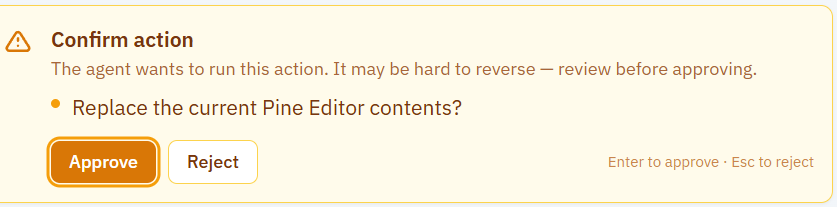
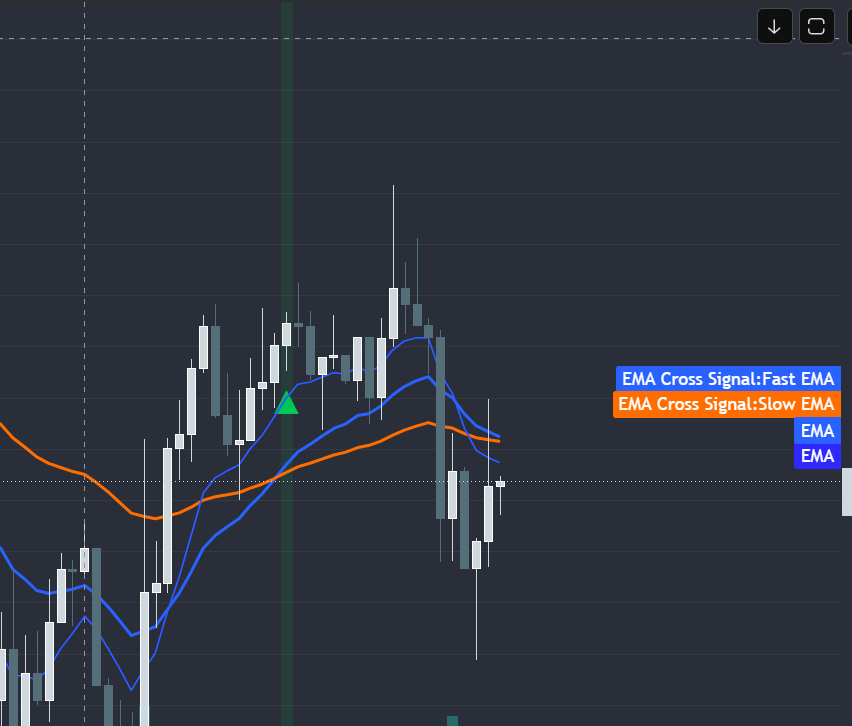 Chart by TradingView
Two notable findings:
- The Pine Script authoring capability is blocked on Free plans. This is the most important plan-gated feature.
- The response shifted to Korean even though the prompt was in English. Remix has its own Language setting — more on this in Watch-Outs below.
Request 5 — SMC Structure Analysis (~10 tools)
“Analyze the SMC (Smart Money Concept) structure of the current chart: identify BOS, CHoCH, Order Blocks, and provide trading scenarios”
For readers unfamiliar with SMC terminology: BOS (Break of Structure), CHoCH (Change of Character), OB (Order Block), and FVG (Fair Value Gap) are core institutional-flow concepts used by SMC traders.
A complete SMC breakdown including:
- BOS at $77,640 (15m structure)
- CHoCH at $79,181 (4H structure flip)
- Bearish Order Block: $81,080–$82,137
- Bearish FVG: $77,477–$77,856
- Sell-Side Liquidity at $76,051
- Two complete scenarios (continuation, counter-trend) with R:R and invalidation
- A “verdict” with high-conviction signal count (4 of 5 bearish)
For traders using Smart Money Concept frameworks, this level of structure mapping in a single prompt is significant. Manual production usually takes several minutes.
End of Test
- Total requests: 5
- Total elapsed time: ~7 minutes
- Final usage: 3% of Premium’s weekly allowance

Tool Count Pattern
| Request | Type | Tools |
|---|---|---|
| 1 | Single data lookup | 1 |
| 2 | Chart action | 3 |
| 3 | Multi-timeframe analysis | 15 |
| 4 | Pine Script generation | 5 |
| 5 | Structural analysis (SMC) | ~10 |
Requests fall into three weight classes: quick (1–3 tools), creative (5 tools), and deep synthesis (10–15 tools). The 3% total consumption suggests Premium’s 5× weekly allowance is sized for heavy daily use.
Which Plan for Whom
| User Profile | Recommended Plan | Why |
|---|---|---|
| Curious explorer (a few queries/week) | Free (0.25×) | Lets you try basic analysis; no Pine Script |
| Light user (basic chart review) | Essential (1×) | Pine Script unlocked, ~33 weekly requests |
| Active retail trader | Plus (2×) | Most users’ sweet spot, ~65 requests |
| AI-heavy user / power trader | Premium (5×) ⭐ | Effectively unlimited for normal workflows |
| Professional with multi-asset flows | Ultimate (20×) | Only justified if you genuinely hit Premium limits |
| Pro team / institutional | Insiders | Invite-based, unlimited |
Key insight: most readers should not jump to Ultimate. In this test, Premium handled the heaviest possible request mix in 3% — Ultimate would have been 0.75% for the same workload. Unless you genuinely run hundreds of complex queries weekly, Premium is the sweet spot.
For Free tier users specifically: the Pine Script block is the deal-breaker. If you only need to read and analyze existing scripts, Free works. If you want Remix to author or modify Pine code, you must upgrade.
This article contains affiliate links to TradingView plans. We may earn commission on plan purchases at no extra cost to you. All test data is genuine and unaffected by affiliate arrangements.
[Affiliate placeholder: Choose a TradingView plan]
Watch-Outs
A few things that aren’t on the spec sheet but matter in practice.
Remix Has Its Own Language Setting
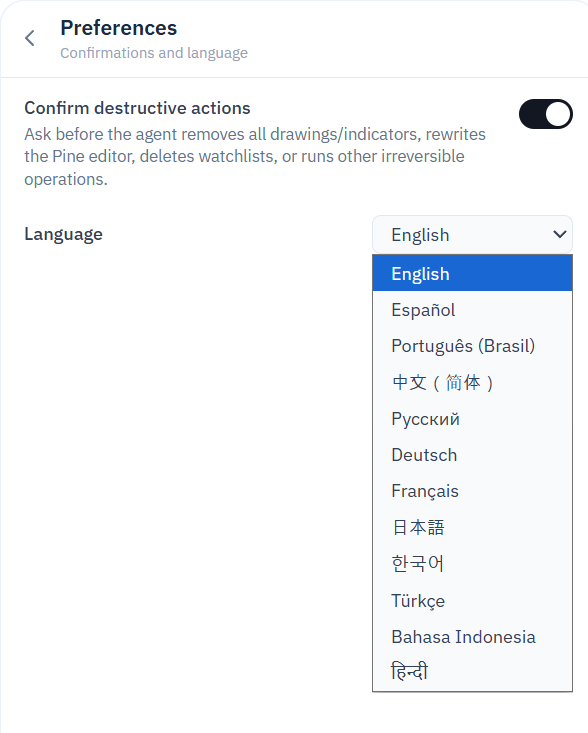
This caught me off guard during testing: prompting in English doesn’t guarantee an English response. Remix has its own Language setting in Preferences that overrides prompt language.
In my test, Request #4 (the Pine Script prompt) returned a Korean confirmation message because Remix’s Language was set to Korean — independent of the TradingView UI language and independent of the prompt language.
Fix: Open Remix’s Preferences (gear icon → Confirmations and language) and set Language to your preferred response language. This is the single setting that controls response language consistency.
Confirmation Toggle for Destructive Actions
Remix asks for explicit approval before replacing Pine Editor contents, removing drawings, or running other irreversible operations. The dialog reads: “The agent wants to run this action. It may be hard to reverse — review before approving.”
This safety check is a toggle in Preferences — on by default. You can disable it if you want fully autonomous execution, but the safer default is to leave it on. The cost of one accidental Pine Editor wipe outweighs the seconds saved by skipping confirmations.
This is a trust-by-design pattern that’s surprisingly rare in AI tools.
Tool Count Is Visible
Each response shows a “Show details — N tools” link. Click it to see exactly which tools Remix invoked. This transparency makes it easy to identify which prompt styles consume more of your weekly allowance.
Multi-Timeframe Auto-Expansion
A 15m chart prompt may pull 4H and 1D context automatically. This is usually what you want — but it also means a deceptively short prompt can become an expensive multi-tool analysis.
Free Tier Pine Script Block
The single biggest plan-tier gate. Free users can ask Remix to read and explain existing Pine code, but cannot ask it to author or modify code. Upgrade to Essential or higher to unlock this.
What I’d Test If I Had More Time
Honesty matters. This test ran on Premium for ~7 minutes. Future versions of this guide could include:
- Direct Free-tier comparison — running the same 5 requests on a Free account to confirm consumption patterns and Pine Script block behavior.
- Limit reset timing — pushing usage to 100% to confirm the reset cadence (the spec page says weekly, but the exact day-of-week reset isn’t documented yet).
- Mobile (Telegram) integration — the @TVRemixBot exists but wasn’t covered here.
- External MCP server connection — Remix supports custom MCP integrations via
tvremix.xyz/mcp, but setup deserves its own walkthrough. - Edge cases — long-running prompts, error handling, multi-chart workflows.
Updates will be added here as these are tested.
FAQ
Q: How many requests can I make per week on each plan?
A: Free (0.25×): ~8. Essential (1×): ~33. Plus (2×): ~65. Premium (5×): ~165. Ultimate (20×): ~660. Insiders: unlimited. Estimates based on a real test where 5 diverse requests consumed 3% on Premium.
Q: Does Pine Script generation work on the Free plan?
A: No. Pine Script authoring and modification is reserved for Essential and above. Free users can still read and analyze existing scripts.
Q: How is usage measured — by request count or by tool calls?
A: It scales with tool usage. A single prompt may invoke 1 to 15+ tools depending on complexity. Multi-timeframe analyses are the heaviest; single data lookups are the lightest.
Q: Can I upgrade my TradingView plan mid-week if I run out?
A: Upgrading your TradingView plan increases your Remix allowance immediately, since the limit scales with plan tier.
Q: Does Remix respond in English or in my UI language?
A: It follows Remix’s internal Language setting in Preferences — not the prompt language, not the TradingView UI language. Set it explicitly in Preferences > Confirmations and language for consistent results.
Q: Is Remix from TradingView directly?
A: It’s developed by a third party (tvremix.xyz) but officially promoted on the TradingView blog. The settings panel labels the current product as “Public Beta — a preview of the official TradingView AI Copilot launching later this year”, so native TradingView integration is on the roadmap.
Updates & Changelog
- 2026-05-19 — Initial publication. Tested on Premium (5×) plan, Remix v0.15.10.
Educational use only. Not financial advice. Numbers reflect a single test session on 2026-05-19.