There’s a common claim that asking Remix one big “master prompt” saves significant usage versus splitting your questions. I tested both approaches with the same Bitcoin analysis on Premium (5×): four split questions consumed 10 tools (1% usage); a single master prompt with broader scope consumed 19 tools (also 1% usage).
💡 Master Prompt vs. Split Questions: Key Takeaways
- Myth Debunked: Asking a single master prompt does NOT save quota over split questions. Both burned exactly 1% of Premium weekly usage in our controlled tests.
- Session Context Subsidy: Chaining questions in the same session is surprisingly efficient. The last synthesis question cost only 2 tools thanks to automatic session context reuse.
- Strategic Choice: Use Master Prompts when you need a highly cohesive, self-contained report with automatic chart drawings in one shot. Use Split Questions for interactive, stepwise analysis.
The 5× savings claim circulating online is exaggerated. But the master prompt does pack 9 more tools of work into the same 1% bucket — it doesn’t save quota, it produces more output per percent. Remix is officially promoted on the TradingView blog and distributed via the Chrome Web Store.
This article contains affiliate links to TradingView plans. We may earn commission on plan purchases at no extra cost to you. All test data is genuine and unaffected by affiliate arrangements.
The Conventional Wisdom
A popular Korean-language guide claims that splitting questions burns usage 5× faster than a single comprehensive prompt. The pitch: “ask one master prompt, save 5× your weekly allowance.”
The intuition makes sense at first glance — each new prompt is a new round trip, the AI re-loads context, tool calls multiply. But intuition isn’t measurement.
The Test
Environment
- TradingView Premium (5× weekly limit)
- BTCUSDT 15-minute chart
- Remix v0.15.10
- Date: 2026-05-19
- Starting usage: 3% (carryover from prior tests)
Set A — Four Split Questions
- “What is the current trend on BTCUSDT 15m chart?”
- “What does the momentum (RSI, MACD) look like right now?”
- “How has the volume been over the last 24 hours?”
- “Based on the above, what are the trading scenarios for the next 24 hours?”
Set C — Single Master Prompt
The same scope an experienced trader might want, asked in one shot:
Generate a comprehensive trading analysis report for BTCUSDT.

1. Technical Analysis & Drawing
- Read the trend (short/mid-term) from visible chart prices
- Draw key support/resistance zones and Fibonacci retracements
  directly on the chart
- Conclude with technical ratings based on RSI and MACD

2. Fundamental & Real-time News
- Summarize key fundamental metrics for BTCUSDT
- Pull the latest 24h regulatory filings or news headlines

3. Trading Setup with Risk Filter
- Suggest a specific setup with R:R >= 2:1
- Set stop-loss based on prior swing low or key MA breach
- Output a webhook message format for external bot integration
Results
| Approach | Prompts | Total Tools | Usage Change |
|---|---|---|---|
| Set A — Split (4 questions) | 4 | 10 | +1% |
| Set C — Master (1 question) | 1 | 19 | +1% |
Same usage cost. Very different scopes of output.
Set A Tool Breakdown
| Question | Tools | Notes |
|---|---|---|
| A1 Trend | 2 | Fresh OHLCV + RSI fetch |
| A2 Momentum | 2 | Delegated technicals + ratings |
| A3 Volume | 4 | Multi-source volume analysis |
| A4 Scenarios | 2 | Reused prior context — no new fetches |
A4 is the surprise: a complex synthesis request that cost only 2 tools because Remix reused the data Set A had already built.
Set C Tool Breakdown
19 tools for one prompt: quote, study values, OHLCV across three timeframes, news fetch, economic calendar, compute calls for Fibonacci levels, drawing commands for S/R + Fib retracement. All packed into a single response. (For SMC traders: the prompt asked for support/resistance, FVG, OB, and Fibonacci zones, all of which were drawn directly on the chart.)
The Hidden Variable — Session Context Reuse
This is the part most “splitting wastes your usage” claims miss.
Within the same session, Remix doesn’t pay full price for each follow-up. A4 (“scenarios based on the above”) cost only 2 tools because the trend, momentum, and volume data from A1–A3 were still in context. If you’d asked A4 as a cold-start query in a new session, it would have cost 12+ tools.
This is why splitting questions doesn’t burn usage the way the conventional wisdom suggests. Session context reuse subsidizes the follow-ups.
The Master Prompt — Did the Bold Claims Hold Up?
The Korean blog that motivated this test made several specific claims about Remix’s capabilities. Most checked out.
What Worked (Verified)
| Claim | Result |
|---|---|
| Smart Drawing — S/R + Fibonacci on chart | ✅ 9 horizontal levels + Fib retracement drawn |
| Last 24h news headlines | ✅ 5 headlines with sources |
| Macro events from economic calendar | ✅ 3 scheduled events |
| Fundamental / on-chain metrics | ✅ Volume, market cap, retail demand, futures, whales (BTCUSDT auto-mapped to on-chain instead of P/E since it’s crypto) |
| R:R ≥ 2:1 setups | ✅ Primary 2.31:1, Secondary 2.14:1 |
| Webhook JSON output | ✅ Complete payload with all parameters |
The 19-tool count makes sense for that scope — it’s doing roughly 3× the work of any single split query.
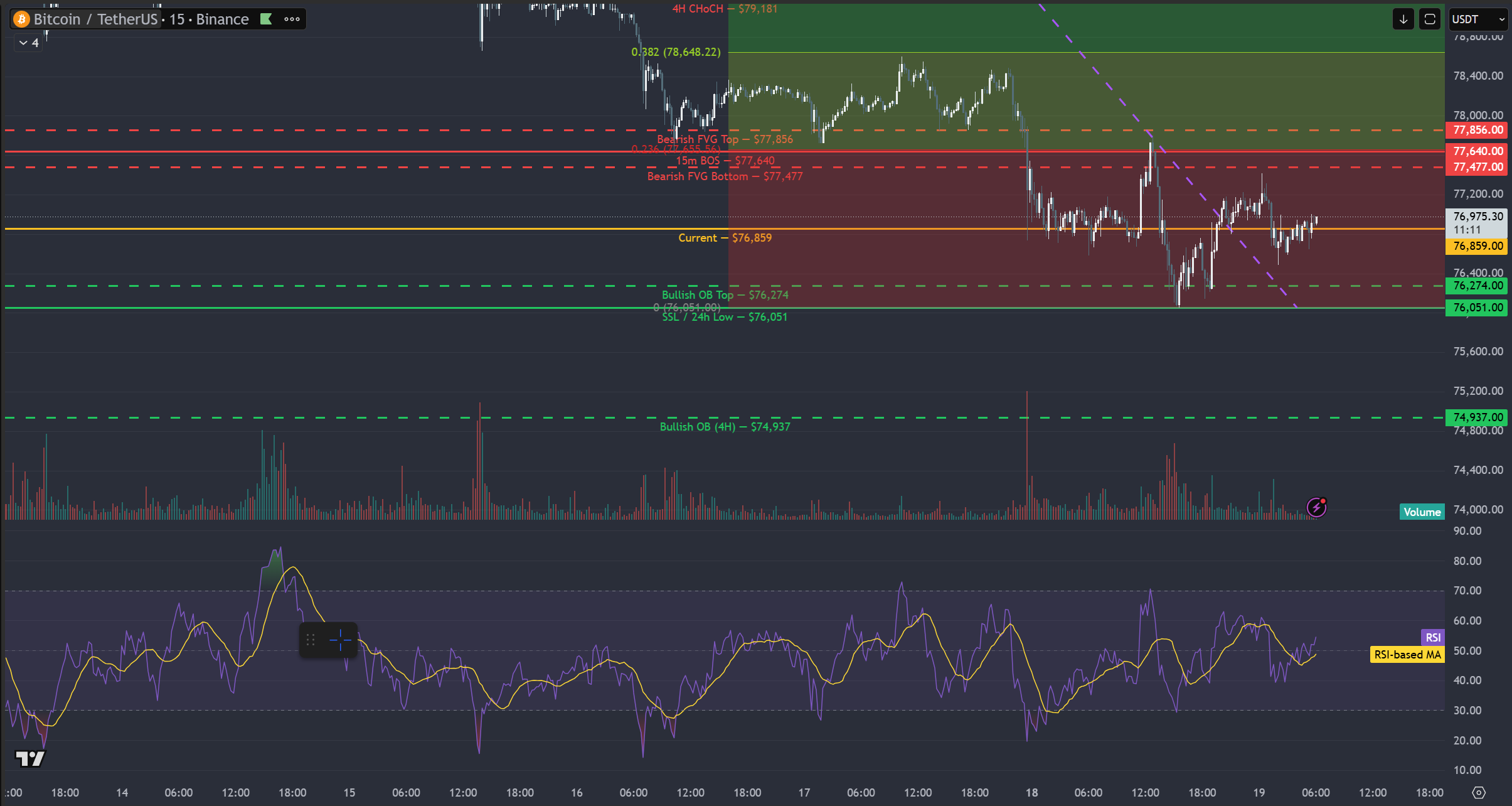 Chart by TradingView
What Was Exaggerated
| Claim | Reality |
|---|---|
| “5× usage savings” | ❌ Same 1% cost in both approaches |
| “Splitting wastes your quota” | ❌ Session context reuse keeps follow-ups cheap |
A Bonus Finding — Language Setting Reappears
The master prompt was written in English. The response came back in Korean.
This is the second time this happened in testing — the first was during the Weekly Limits test. Remix’s response language follows its own Language setting in Preferences, not the prompt language or the TradingView UI.
To force English: Remix sidebar → gear icon → Confirmations and language → Language → English.
Practical Recommendation
Neither approach is universally better. Each has a use case.
Use split prompts when
- You’re exploring iteratively (“trend? OK. momentum? OK. now scenarios?”)
- You don’t know upfront what scope you need
- You want to build understanding incrementally
- Each question’s answer might change what you ask next
Use the master prompt when
- You know exactly what you want (technical + fundamental + news + setup)
- You want a polished, self-contained report
- You’re sharing the output with someone else
- You want webhook JSON or similar structured output
For weekly quota: in our test, both consumed the same 1%. The master prompt packs more output into the same percentage. If your goal is “extract maximum analysis per percent,” the master prompt wins. If your goal is “ask one question at a time and think between answers,” splitting wins on natural workflow.
The Master Prompt Template
If you want to try it yourself, here’s the English version of the master prompt used in this test. Replace BTCUSDT with your symbol.
Generate a comprehensive trading analysis report for [SYMBOL].

1. Technical Analysis & Drawing
- Read the trend (short/mid-term) from visible chart prices
- Draw key support/resistance zones and Fibonacci retracements
  directly on the chart
- Conclude with technical ratings (buy/sell/neutral) based on
  RSI and MACD

2. Fundamental & Real-time News
- Summarize key fundamental metrics for [SYMBOL]
- Pull the latest 24h regulatory filings or news headlines that
  explain recent price moves

3. Trading Setup with Risk Filter
- Suggest a specific setup (entry, take-profit, stop-loss)
  with R:R >= 2:1
- Set the stop-loss based on prior swing low or key MA breach
- Output a webhook message format at the end for external bot
  integration
Expect ~19 tools and ~90 seconds of response time on a Premium plan.
What This Means for Your Quota Math
Working backward from this test:
| Plan | Multiplier | Master Prompts per Week | Split Sessions per Week* |
|---|---|---|---|
| Free | 0.25× | ~5 | ~20 |
| Essential | 1× | ~20 | ~80 |
| Plus | 2× | ~40 | ~160 |
| Premium ⭐ | 5× | ~100 | ~400 |
| Ultimate | 20× | ~400 | ~1,600 |
* Split session = ~4 chained questions like Set A.
For most active traders, even Plus comfortably supports daily master-prompt usage. The “Free is too restrictive for AI-heavy use” conclusion from the Weekly Limits article holds — but the gap between Plus and Premium is smaller than the multiplier suggests, since session context reuse stretches each percent further.
FAQ
Q: Does the master prompt actually save usage?
A: In our test, no — both approaches cost 1%. The master prompt packs more output into the same percentage, but doesn’t save the percentage itself.
Q: Does Remix really draw on the chart?
A: Yes. The master prompt produced 9 horizontal S/R lines plus Fibonacci retracement levels, drawn directly on the BTCUSDT 15m chart.
Q: Can it pull SEC filings?
A: It pulls news headlines that include regulatory filings when relevant. In our test it pulled 5 BTC-related headlines plus economic calendar events.
Q: What if my workflow is iterative?
A: Splitting works fine. Session context reuse makes follow-ups cheap — A4 in our test cost only 2 tools because earlier context was reused.
Q: Is the “5× savings” claim accurate?
A: No. Measured: same 1% cost for both. The claim is an exaggeration.
Q: Why didn’t Remix respond in English when I asked in English?
A: Remix’s Language setting in Preferences overrides prompt language. Set it to English explicitly for consistent English responses.
Updates
- 2026-05-19 — Initial publication. Tested on Premium (5×), Remix v0.15.10.
Educational use only. Not financial advice. Numbers reflect a single test session on 2026-05-19.