Claude Code blocks you with a “usage limit reached” message, but there is no single limit behind it. There are three: a 5-hour session window, a 7-day weekly cap, and optional usage credits for going past your plan’s included amount. Which wall you hit decides whether you wait five hours or up to seven days. The trap most people miss: your claude.ai chats, Claude Code, and Claude Desktop all draw from the same allowance.
This guide separates the three limits using Anthropic’s official documentation, not guesswork. Where popular guides disagree on dates or structure, this notes it. Limits and plan details reflect May 2026 and change over time, so the official Usage settings page is the final word for your own account.
Why This Guide Exists
Search for why Claude Code stopped you and you’ll find guides that blur the limits together — calling everything “the weekly cap,” or citing the wrong start date for when weekly limits arrived. The result is people waiting for the wrong reset. The structure is actually clean once you separate the three layers, and each layer resets on its own clock. For how Claude Code’s pricing compares to other AI coding tools, see our breakdown of AI coding tool billing; this guide focuses on the limits themselves.
The Three Limits, Separated
Claude Code’s usage is governed by three distinct mechanisms that stack.
1. The 5-hour session window. This is the one you hit most often in a heavy coding session. Once you reach your plan’s included usage, the included usage limit resets every five hours. It’s a rolling window tied to when your session started, not a fixed clock time.
2. The 7-day weekly cap. Introduced for Pro and Max subscribers, this is a longer reserve that sits on top of the 5-hour window. Anthropic introduced two weekly rate limits that reset every seven days: one overall usage limit, and one specific to its most advanced Opus model. So even if your 5-hour windows keep renewing, the weekly cap can run out first under heavy use.
3. Usage credits (extra usage). Past your plan’s included amount, you can keep working on credits. Usage credits are available on Pro, Max, Team, and seat-based Enterprise plans, and apply to both Claude conversations and Claude Code. One detail worth knowing: disabling credits doesn’t change the 5-hour reset timing — that window still resets on its own schedule.
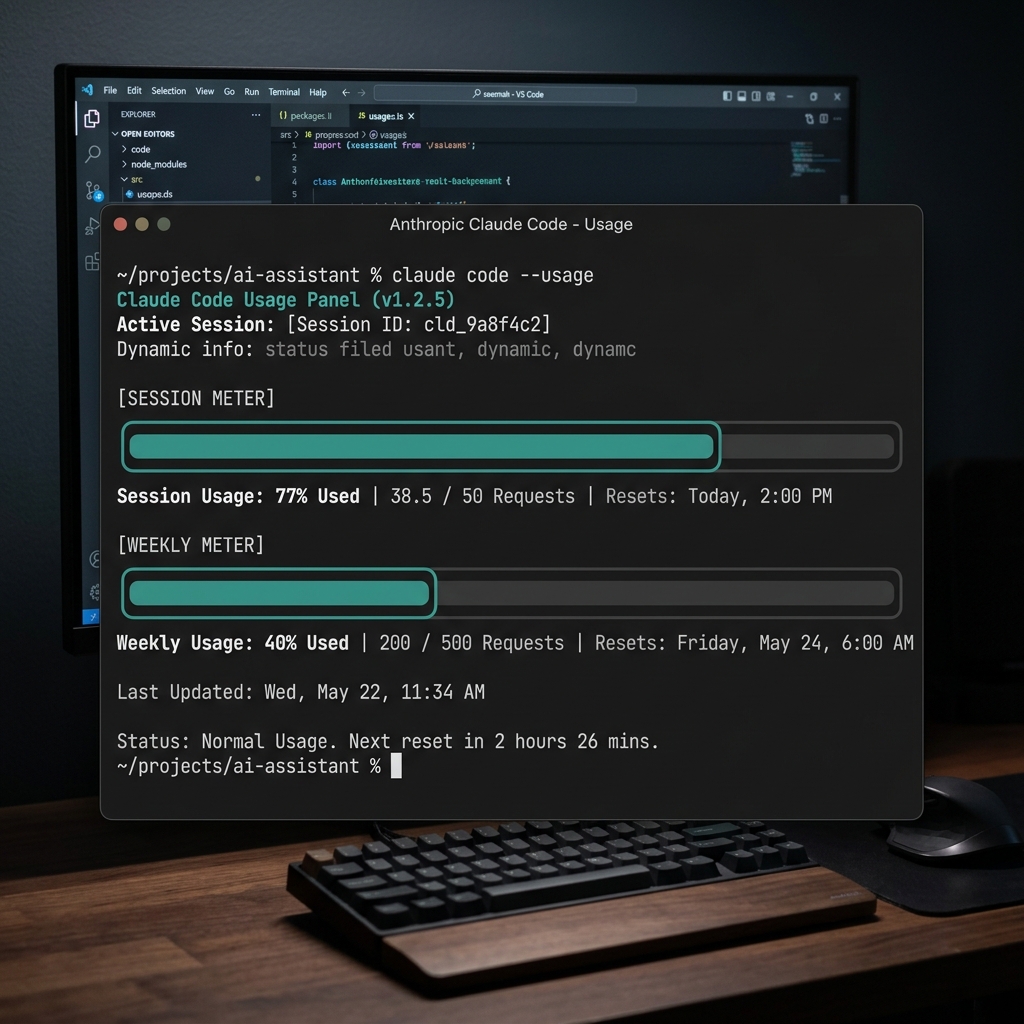
The screenshot below shows the first two layers live in the Usage panel — a 5-hour session bar and a 7-day weekly bar, each with its own reset countdown. The credits layer only appears once you exceed the included amount.
Which One Are You Hitting?
The block message looks the same, but the wait is not. If you’ve hit the 5-hour window, you’re back in a few hours. If you’ve exhausted the weekly cap, waiting five hours does nothing — you wait until the 7-day window rolls over, which can be days away.
To tell them apart, check the Usage panel. You can use Claude Code’s /usage slash command in the terminal, or visit the usage settings page in your browser, to see remaining usage and weekly limit status. The bar that’s full is the one blocking you. The Opus-specific weekly cap is a common surprise: you can be locked out of Opus while still having room on other models.
The Shared-Pool Trap
Do your claude.ai chats count against your Claude Code limit? Yes — and this is the part that catches developers off guard. Claude Code is not metered separately from your chat usage. Usage across all Claude surfaces — claude.ai, Claude Code, and Claude Desktop — counts toward the same usage limit.
A long chat conversation in the morning can shrink the budget you have for Claude Code in the afternoon. If you’re rationing usage for a coding deadline, that casual claude.ai session is not free — it’s spending the same pool.
When It Resets
The two time-based limits reset differently, and neither is a fixed daily clock.
The 5-hour window is rolling. It starts counting from your first use and resets five hours later, which means your reset time shifts depending on when you began. The weekly cap is a 7-day window that, once exhausted for a given model, only restores when those seven days are up — a five-hour wait won’t touch it.
Because both are rolling rather than pinned to, say, midnight, the only reliable way to know your exact reset moment is the Usage panel’s countdown, not a fixed time you can memorize.
Some third-party reports in mid-May 2026 described a one-off account-wide counter reset and a temporary promotional bump to weekly limits. These were not reflected in Anthropic’s official usage documentation at the time of writing, so treat them as unconfirmed and rely on your own Usage panel for current values.
What You Can Do When You’re Blocked
Three options, in order of effort. If you hit your usage limit, you can wait for it to reset, upgrade your plan, or purchase usage credits.
Beyond that, the most durable fix is spending less per task. Anthropic’s own guidance leans on reuse: use projects for anything you’ll reference multiple times, and provide complete context about your coding environment in your initial message, since the more you reuse the same content, the more benefit you get from caching. For Claude Code specifically, writing reusable skills for recurring workflows means you re-send less context on every run.
Plan & Limit Reference
| Limit | Reset cadence | Applies to | Where to check |
|---|---|---|---|
| Session (5-hour) | Every 5 hours, rolling from session start | All paid plans | /usage or Usage settings |
| Weekly — overall | Every 7 days, rolling | Pro, Max (from Aug 28, 2025) | /usage or Usage settings |
| Weekly — Opus only | Every 7 days, rolling | Pro, Max | /usage or Usage settings |
| Usage credits | N/A (pay past included usage) | Pro, Max, Team, seat-based Enterprise | Usage settings |
Values and plan coverage reflect Anthropic documentation as of May 2026 and may change. Your Usage settings page is authoritative for your account.
FAQ
I hit a limit but five hours passed and I’m still blocked. Why?
You’re likely on the weekly cap, not the 5-hour window. If you exhaust your weekly cap for a model, waiting five hours won’t restore access — you must wait until the 7-day window resets.
Do my claude.ai chats use up my Claude Code limit?
Yes. Usage across claude.ai, Claude Code, and Claude Desktop all counts toward the same usage limit.
Is there a fixed daily reset time I can plan around?
No. The 5-hour window rolls from when you started using it, so the reset time shifts. Check the countdown in the Usage panel instead of memorizing a clock time.
What are usage credits?
A way to keep working past your plan’s included usage. They’re available on Pro, Max, Team, and seat-based Enterprise plans and apply to both Claude conversations and Claude Code.
How do I see how much I have left?
Use the /usage slash command in Claude Code, or open the usage settings page in your browser.
Can I be blocked on Opus but not other models?
Yes. The weekly cap includes a separate limit specific to Opus, so Opus can run out while other models still have room.
Sources
- Anthropic — How usage and length limits work: https://support.claude.com/en/articles/11647753-how-do-usage-and-length-limits-work
- Anthropic — Manage usage credits for paid plans: https://support.claude.com/en/articles/12429409-manage-extra-usage-for-paid-claude-plans
- Anthropic — Usage limit best practices: https://support.claude.com/en/articles/9797557-usage-limit-best-practices
Updates & Changelog
- 2026-05-21 — Initial publication. Limit structure (5-hour session, 7-day weekly overall + Opus, usage credits) sourced from Anthropic support documentation. Weekly limits took effect for Pro and Max on August 28, 2025. Mid-May 2026 reports of a one-off reset and promotional limit bump are noted as unconfirmed pending official documentation.
Educational use only. Limits and plan details change; verify current values on your Anthropic Usage settings page.